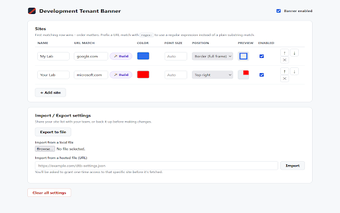
Environment-aware ribbon for Chrome that prevents tenant mistakes
Development Tenant Banner, from CronoTech (CRONOTECH CONSULTING LLC), is a Chrome extension that gives web professionals a clear visual indicator of the environment they are working in, to reduce mistakes across tenants. The tool overlays a customizable colored ribbon on pages, and supports environment definitions and per-environment labels. It targets IT administrators, cloud developers, and technical consultants who manage multiple web-based environments and want an immediate, persistent cue to avoid editing production systems by mistake.
How does it identify different web environments?
The extension detects environments using substring URL matching, so rules trigger when specific text appears in an address (examples include "-dev" or "staging"). Because detection is text-based rather than platform-specific, the tool can apply the same rules across diverse web platforms and admin consoles without bespoke integrations, making it useful where multiple services and domains share a naming convention.
What is the browser impact and how quickly do changes apply?
The package is extremely small, with an approximate size of 22KiB, and it keeps runtime overhead minimal. Changes to environment definitions take effect immediately without a page reload. Practical outcomes include a tiny install footprint and instant visual updates after editing settings, which reduces interruption during routine environment switches.
Are settings private and where are they stored?
All environment definitions and user settings remain inside the browser; the extension does not send data to external servers. That local-only storage model means there is no tracking or telemetry emitted by the tool. For teams with strict data policies, keeping configuration in the profile prevents exposure of environment metadata to third-party services.
Can it resolve multiple matches and control where the marker appears?
The extension provides a priority control so administrators can reorder environments when more than one URL rule matches a page, which determines which marker takes precedence. A global option lets users select which corner of the window displays the marker. The add-on runs on Chrome and other Chromium-based browsers such as Microsoft Edge and Brave, so it fits common desktop browser choices.
A compact, practical safeguard for administrators who need a quick environment cue
CronoTech, a US-based consulting firm, delivers a focused utility positioned by users as practical and simplicity-oriented. That combination suits teams that need a low-friction visual safeguard against tenant mistakes rather than extensive environment governance. Administrators who want a lightweight reminder tool for daily workflows will find it appropriate; teams needing centralized sync or auditing require complementary systems. Use it as a quick safety layer in multi-tenant workflows.